Digitimes reports no major MacBook Pro update expected in 2018
Digitimes today reports that Apple is reallocating MacBook Pro orders from Quanta to Foxconn in order to lower costs and reduce risks. The company is willing to shift production this year reportedly because Apple does not have a major hardware update for MacBook Pro in the pipeline for this year.
This means that supply of 2017 MacBook Pro will remain strong even if Foxconn encounters yield and quality control problems whilst it ramps up. Apple first launched the modern MacBook Pro design in 2016.
Digitimes says in the past Foxconn has represented about 20% of MacBook Pro orders with Quanta taking up the remaining 80 percent. With the new production schedule, Quanta will be not removed but it sounds like it will lose about 30% to give both companies an even split of orders.
Apple likes to have multiple manufacturers and assemblers for its produce to reduce supply side risk and lower prices due to suppliers competing for orders.
Digitimes has an iffy record of predicting Apple products although it is definitely best at reporting higher-level issues of the supply chain, for which this report certainly qualifies. We also have not heard about a major MacBook Pro update in the works from any other of the usual publications.
It is also common for Apple to retain the same chassis design for several generations; the 2016 design is still relatively new. ‘No major update’ still means Apple can update the internals with better specs like adding a 32 GB RAM option alongside new CPUs. It also does not discount some revisions to the butterfly low-travel keyboard, which has received many complaints from users with keys getting easily stuck on the 2016 and 2017 models.
However, more significant changes like a return to the old keyboard design or addition of I/O other than what is there today (Thunderbolt 3 USB-C) is probably not on the cards for this year.
Apple's WebKit Team Proposes W3C Community Group to Strive for More Powerful Graphics on the Web
Apple's WebKit team today proposed a new Community Group at the World Wide Web Consortium (W3C) focused on discussing the future of 3D graphics on the web. The goal of the group is to lead to development of a new Web API that would better prepare web browsers to take advantage of modern, and future, GPU technologies on a variety of platforms.
On the WebKit blog, Apple's Dean Jackson says new software APIs "better reflect" modern GPUs, but that many of the major ones -- Direct3D 12 from Microsoft, Metal from Apple and Vulkan from Khronos Group -- aren't available on all platforms. While the success of the web requires common standards, Jackson argues, these platform-specific APIs make following a single API, like OpenGL, impossible in the future.
Instead, Apple's WebKit team is proposing that a new standard is needed. The new standard needs to provide a "core set of required features," an API that can be implemented on a variety of platforms with different system technologies, sitting on top of technologies like Direct3D, Metal and Vulkan, and the security and safety required for the Web.
While being a new open standard that's compatible with platform-specific technologies, Apple says the new standard must also be easy to to adopt, "expose the general-purpose computational functionality of modern GPUs," and work well with emerging standards like WebAssembly and WebVR.
Apple's initial proposal, which it calls an experiment, is "WebGPU." Apple says WebGPU started out as a mapping of Metal to JavaScript, and some graphics programmers are calling the proposal "Metal on the Web." Apple says it doesn't expect WebGPU to become the actual API in the new standard, but it does think there is "a lot of value" in its prototype.
Jackson says that WebGPU is much more object-oriented than WebGL, which is why Jackson says grants WebGPU its efficiencies. For instance, WebGPU handles "states" differently, reducing the work needed before a drawing operation.
The WebKit team will share its prototype with the Community Group, and is also inviting everyone with interest or experience in GPU web technologies to join the group.
Fixing an Installer .pkg Stuck on "Verifying" in Mac OS X
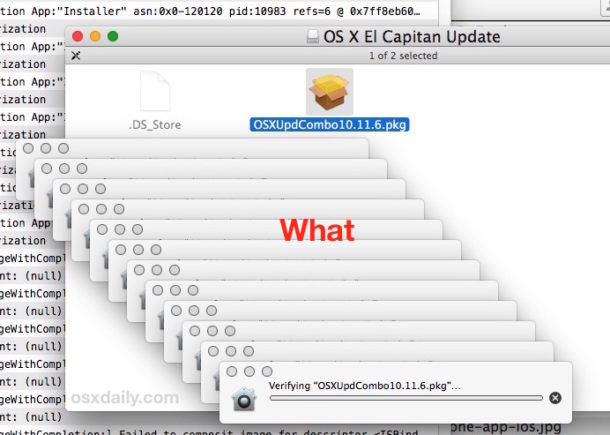
Mac users may find that a system update, installer, or package (pkg) can get completely stuck in a verification sequence, with a pop-up alert that says “Verifying ‘name.pkg’…” while showing the Gatekeeper icon and a progress bar that never updates. The effect is the package or installer won’t run as it never completes verification, making it impossible to install. This is a strange issue that can cause some alarm, because it can happen with both third party packages and installers, as well as updates and packages that come directly from Apple. If you ever run into the package stuck on verifying issue within Mac OS X, we’ll show you how to fix the problem and get the package update to install on the Mac anyway.
Apple Reportedly Shifting Car Plans to 2021

Apple has reportedly shifted its target date for Apple Car back to 2021, one year later than earlier leaks suggested. Waiting another year sucks, but it won’t affect Apple Car’s eventual success.
Corning Debuts Gorilla Glass 5 With Improved Drop Protection
Corning today unveiled its next-generation Gorilla Glass product, Gorilla Glass 5. The new glass, designed to be used in mobile device displays, offers improved protection against breakage from accidental drops.

Building on previous generations of Gorilla Glass, Corning's latest product survives 80 percent of the time when dropped face-down from 1.6 meters (5.2 feet) onto a rough surface during lab tests. According to Corning, Gorilla Glass 5 survives drops four times better than competing glass products.
"With each successive generation of Corning Gorilla Glass, we have taken cover glass technology to new levels. Gorilla Glass 5 is no exception, extending Corning's advantage in drop performance over competitive glasses," said John Bayne, vice president and general manager, Corning Gorilla Glass. "With many real-world drops occurring from between waist and shoulder height, we knew improving drop performance would be an important and necessary advancement."
Corning's Gorilla Glass 5 will begin making its way into products starting later in 2016, and it is a prime candidate for inclusion in either the 2016 iPhone 7 and/or the 2017 iPhone 8. Corning has been a long-time supplier for Apple, with Apple using its Gorilla Glass for its iPad and iPhone lineup. Corning's last Gorilla Glass product, Gorilla Glass 4, came out in 2014
Manage Your Business Better: Top Online Booking Software For Mac
To get ahead in the travel and hospitality industry means taking advantage of online booking apps and cloud technology. An important part of this is being able to accept online bookings at any time but developing an in house booking system is both costly and time consuming. Luckily, there are some excellent cloud-based reservation and online booking software for Mac users who run a business that needs to manage appointments.
These apps are all based in the cloud and they look great on a Mac. There’s zero maintenance at your end, and you can access them from any device. They’re also easy to use and you can start accepting reservations through your website and social media channels instantly.
iPhone Contacts Disappeared? How to Fix Missing Phone Contacts in iOS

A strange bug that continues to persist in iOS for iPhone mysteriously causes all phone contacts to suddenly disappear from the Phone app on the device. Most users will never experience the missing contacts bug, but it can be disconcerting if encountered.
This missing contacts bug is not subtle and seems to happen at random, with the Phone app losing the “Favorites” and “Contacts” tabs, as well as the Phone app losing all identifying contact information for existing phone numbers, making every phone number in the recents list appear as unrecognized with no attached contact name, picture, or any other details.
Obviously if you suddenly lose all of your iPhone contacts it can be a fairly alarming experience, since so many of us depend on the iPhone for basically holding onto our address books of colleagues and loved ones.
But don’t freak out quite yet, the good news is the missing contacts bug is usually really easy to fix for iPhone users.

How to Fix Disappeared iPhone Contacts & Favorites
- Open the “Settings” app and go to iCloud, be sure that “Contacts” is set to the ON position, if it is not enabled turn that setting ON again
- Force reboot the iPhone by holding down the Home button and Power button concurrently until you see the Apple logo appear on screen, then release both buttons
- Once booted, return to the Phone app, Contacts and Favorites should be visible again as usual
For any instance where the missing iPhone contacts bug is encountered, the above steps alone should fix the problem. This is because it is rare that the iPhone contacts are actually gone, it’s just that a bug has prevented them from showing up, and the associations from iCloud need to be intact and the phone rebooted to get things to show properly again. There are some exceedingly rare scenarios where the contacts may be gone completely, usually by deliberate action by a user, and if you run into that type of scenario then you can recover deleted contacts by following this guide.
This strange iPhone bug has been around for years, though many users tend to experience it after updating iOS it can also happen out of the blue. Perhaps because it is so random and thus difficult to replicate in any reliable fashion is why such a bug persists and has not yet been resolved in the latest versions of iOS (iOS 9.3.3 included). Fortunately, the fix is straight forward, so if you find your contacts are missing, favorites are gone, and the Phone app in iPhone is blank, reboot the iPhone and flip iCloud Contacts back on again, and you should be back to normal in no time at all.
Intel Begins Shipping First Kaby Lake Processors, but Most Macs Won't Get Them Until 2017
During Intel's second quarter earnings call yesterday afternoon, Intel CEO Brian Krzanich told investors and reporters that Intel has begun shipping the first of its 7th Generation Core processors, known as Kaby Lake.
Kaby Lake is the third member of the 14-nanometer process, following Broadwell and Skylake. It is the first processor Intel has released since announcing the company will no longer adhere to the "tick-tock" processor release cycle, which saw it alternating between shrinking chip fabrication processes and building new architectures each year.
Intel's last two chip releases have been plagued with long delays, and moving away from the tick-tock cycle will allow it to push out new chip updates on a regular basis. Apple's Macs, such as the Retina MacBook Pro and the iMac, have been impacted by Intel's chip delays over the last few years, resulting in long periods of time between updates and unusual update cycles.
Kaby Lake is a semi-tock with optimized microarchitecture, offering support for Thunderbolt 3, native USB 3.1, and DisplayPort 1.2. Krzanich did not offer details on which chips have started shipping, but an old Intel roadmap suggests low-power Core M chips and U-series chips with GT2 graphics (likely not suitable for the MacBook Air) will be the first to ship out.
Kaby Lake chips appropriate for the Retina MacBook Pro, the machine everyone is most curious about, may not launch until the very end of 2016 or the beginning of 2017 and thus may not be released in time for inclusion in this year's rumored update.