Definitive Guide to Using Negative Margins
Since the recommendation of CSS2 back in 1998, the use of tables has slowly faded into the background and into the history books. Because of this, CSS layouts have since then been synonymous with coding elegance.
Out of all the CSS concepts designers have ever used, an award probably needs to be given to the use of Negative Margins as being the most least talked about method of positioning. It’s like an online taboo—everyone’s doing it, yet no one wants to talk about it.
1. Setting the record straight
We all use margins in our CSS, but when it comes to negative margins, our relationship somehow manages to take a turn for the worse. The use of negative margins in web design is so divided that while some of us absolutely love it, there are also those who simply think it’s the work of the devil.
A negative margin looks like this:
#content {margin-left:-100px;}
Negative margins are usually applied in small doses but as you’ll see later on, it’s capable of so much more. A few things to note about negative margins are:
- They are extremely valid CSS
I’m not kidding on this one. W3C even says that, “Negative values for margin properties are allowed…” ‘Nuff said. Check out the article for more details. - Negative margins are not a hack
This is especially true. It’s because of not understanding negative margins properly that it got its hackish image. It only becomes a hack if you use it to fix an error you made elsewhere. - It goes with the flow
It does not break the flow of the page if applied to elements without floats. So if you use a negative margin to nudge an element upwards, all succeeding elements will be nudged as well. - It is highly compatible
Negative margins are wholly supported across all modern browsers (and IE6 in most cases). - It reacts differently when floats are applied
Negative margins are not your everyday CSS so they should be applied with care. - Dreamweaver doesn’t understand it
Negative margins don’t show up in the Design View of DW. Why are you even checking your site in Design View anyway?
2. Working with negative margins
Negative margins are very powerful when used correctly. There are 2 types of scenarios where negative margins take center stage.
Negative Margins on Static Elements
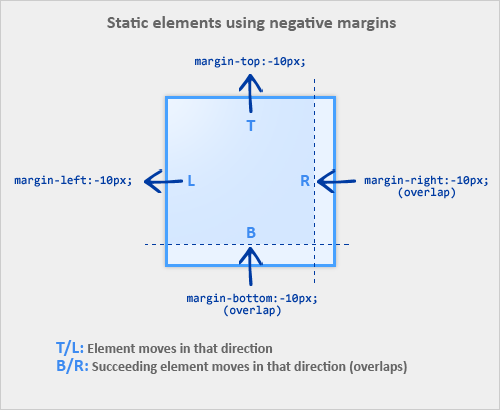
A static element is an element with no float applied. The image below illustrates how static elements react to negative margins.
- When a static element is given a negative margin on the top/left, it pulls the element in that specified direction. For example:
/* Moves the element 10px upwards */ #mydiv1 {margin-top:-10px;} - But if you apply it to the bottom/right, it doesn’t move the element down/right as you might think. Instead, it pulls any succeeding element into the main element, overlapping it.
/* * All elements succeeding #mydiv1 move up by * 10px, while #mydiv1 doesn’t even move an inch. */ #mydiv1 {margin-bottom:-10px;} - If no width is applied, adding Negative Margins to its left/right pulls the element in both directions increasing its width. It’s here that the margin acts like a padding.
Negative Margins on Floated Elements
Consider this as our actual markup:
HTML
<div id="mydiv1">First</div>
<div id="mydiv2">Second</div>
- If a negative margin is applied opposite a float, it creates a void leading to the overlapping of content. This is great for liquid layouts where one column has a width of 100% while the other has a definite width, like 100px.
/* A negative margin is applied opposite the float */ #mydiv1 {float:left; margin-right:-100px;} - If both elements are floated left and
margin-right:-20pxis applied to#mydiv1, #mydiv2treats#mydiv1as if it were 20px smaller in width than it actually is (thus, overlapping it). What’s interesting is that the contents of#mydiv1don’t react at all and continue to retain its current width. - If the negative margin is equal to the actual width, then it overlaps it entirely. This is because margins, padding, borders, and width add up to the total width of an element. So if a negative margin is equal to the rest of the dimensions then the element’s width effectively becomes
0px.