Definitive Guide to Using Negative Margins
3. Effective Techniques
Since we now know that applying a negative margin is valid CSS2 code, using it provides for some very interesting CSS techniques:
Making a single <ul> into a 3-column list
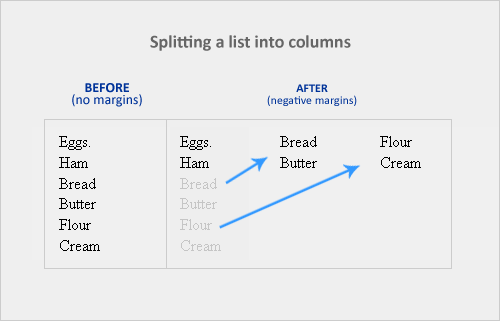
If you have a list of items which are just too long to display vertically, why not divide them into columns instead? Negative margins let you do this without having to add any floats or additional tags. It’s amazing how it easily lets you divide the list below into 3 separate columns, like so:
HTML
<ul>
   <li class="col1">Eggs</li>
   <li class="col1">Ham<li>
   <li class="col2 top">Bread<li>
   <li class="col2">Butter<li>
   <li class="col3 top">Flour<li>
   <li class="col3">Cream</li>
</ul>
CSS
ul {list-style:none;}
li {line-height:1.3em;}
.col2 {margin-left:100px;}
.col3 {margin-left:200px;}
.top {margin-top:-2.6em;} /* the clincher */
By adding margin-top:-2.6em (twice the line-height of <li>) to .top, all elements move up in perfect alignment. Using a negative margin is more appropriate than applying relative positioning since you only have to apply it to the first of the new columns instead of to each <li> tag. Cool, huh?
Overlap for added emphasis
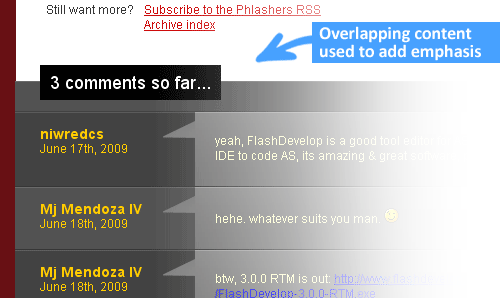
Overlapping elements on purpose is also a good design metaphor. It adds emphasis to specific elements since the overlapping effect creates the illusion of depth. A good example would be the comments section of Phlashers.com, which uses an overlapping technique to draw attention to the number of comments a post has. Combine this with the z-index property and a little creativity and you’ve got it made.
Smashing 3D text effects

Here’s a neat trick. Create Safari-like text, which are slightly beveled by creating 2 versions of your text in 2 different colors. Then use negative margins to overlap one over the other with a discrepancy of around 1 or 2 pixels and you’ve got selectable, robot-friendly beveled text! No need for huge jpegs or gifs which devour bandwidth like fat pigs.
Simple 2-column Layouts
Negative margins are also a great way to create simple 2-column liquid layouts where the sidebar has a preset width and the content has a liquid width of 100%
HTML
<div id="content"> <p>Main content in here</p> </div>
<div id="sidebar"> <p>I’m the Sidebar! </p> </div>
CSS
#content {width:100%; float:left; margin-right:-200px;}
#sidebar {width:200px; float:left;}
And there you have a simple 2-column layout record time. It works flawlessly in IE6 too! Now, to prevent #sidebar from overlapping the text inside #content, simply add
/* Prevent text from being overlapped */

#content p {margin-right:210px;}

/* It’s 200px + 10px, the 10px being an additional margin.*/
When used properly, negative margins can also provide what’s called a Flexible Document Structure which absolutely kicks tables in the face. Flexible Document Structure is an accessibility and SEO technique which allows you to arrange your markup in almost any order depending on your intentions. Tom Wright wrote an interesting article which discusses possible applications of negative margins in multicolumn layouts.
Nudging elements into place
This is the most common (and simplest) usage for negative margins. If you’re inserting a 10th div in a sea of 9 other divs and somehow it just won’t align properly, use negative margins to nudge that 10th div into place instead of having to edit the other 9.
4. Bugfixes
Text and Link problems
Using negative margins with floats sometimes pisses off older browsers. Some symptoms include:
- Making links unclickable
- Text becomes difficult to select
- Tabbing any links disappears when you lose focus
Solution: Just add position:relative and it works!
My picture got cut-off
If you have the bad luck of using IE6 in the office, sometimes content will suddenly be cut-off when overlapping and floats are concerned.
Solution: Again, just add position:relative to the floated element and everything goes back to normal.
5. Conclusion
Negative margins have a place in modern web design because of its ability to position elements without any additional markup. With more users switching to more updated browsers (IE8 included), the future looks very bright for sites which rely on this technique.
If you have any unique experiences with negative margins, let me know by posting a comment.
6. Resources
More info on negative margins.
- Search This, The Positive Side of Negative Margins
- Severn Solutions, CSS Negative Margins Algebra
- Mindfly, Get Refreshed: Liquid Layouts With Simpler CSS and Without A Semantic Mess
- A List Apart, Creating Liquid Layouts with Negative Margins
- W3.org, Margin Properties
- Branbell, Using Negative Margins
- devarticles, Swapping Column Positions in Web Page Layouts with Negative Margins
- Simplebits, Exceptionally Negative
- CommunityMX, CSS Negative Margins
- brunildo, Horizontal Negative Margins
- Ben Nadel, Negative CSS Margins Are Not Cool
- bluerobo, Centering: Negative Margin