When To Relaunch The Site Redesign
The Planning Stage
To answer the “Where do I begin” question, we must plan appropriately and in sufficient detail. Without a plan, we’ll run into problems later on, causing us to make many fixes and perhaps give up. Or we might finish the redesign (or come close) and realize that it is not coming together as well as we had envisioned.
So, planning is essential. Below are the elements that need to be planned before starting the redesign or even sketching ideas on paper.
Content Requirements
At the beginning, many designers will start thinking about navigation placement, visual elements, the “feel” of the website and so on. For whatever reason, we don’t think of content first. But we should.
No matter how cool Web design is, content is still king. Good design helps, and so a good redesign will help, but it won’t keep the website alive. A redesign requires one to think about readability, imagery and detailed typography (e.g. tags such as pre, blockquote, ol, ul, etc.) first and foremost.
Assess the current website’s readability. It may be great, but could it be better? Even if it’s readable, look for weak points:
- Is there enough contrast?
- Do the alignment, baseline, line height and so on complement the design?
- Does the width of the content area help or hinder the readability of the content?
- If the design is flexible, at what point when it stretches or contracts does the content become illegible?
- Do style elements such as
preandblockquoteserve their purpose and stand out? - Is the font suited to the letter spacing you’ve set, and is it appropriate to your audience and industry?
- Even if readable, could the typography be enhanced by vertical rhythm, a typographic scale or something else?
For more information on many of these matters, check out 8 Simple Ways to Improve Typography In Your Designs.
Get out a notebook and thoroughly analyze the typography of your current design. Get feedback from others (both designers and non-designers) on readability, content placement and overall typographic appeal.
One more thing to consider for the content area is the type and size of your existing content. If images have always been a certain width, the content area’s width will need to be matched accordingly. Likewise, content inside pre tags will not naturally break to the next line or adjust to the new content area’s width (after all, that’s it purpose), so take that into consideration as well. Depending on the website, video, imagery and other multimedia may require a redesign to accommodate the content area’s width and position.
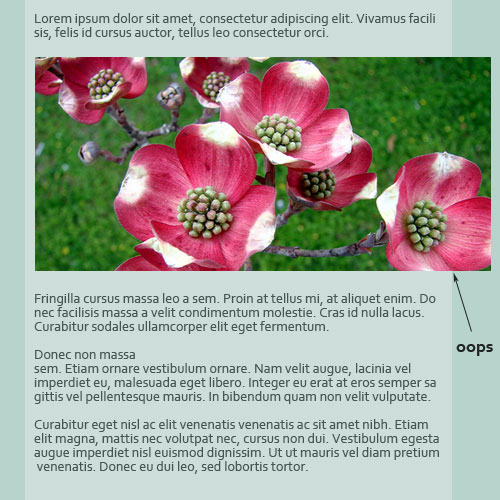
As a general rule, do not redesign the content area to be narrower than what it was before, otherwise a number of complications could arise. If a wide content area has compromised readability, though, approach the resizing systematically. Resize images and optimize content first, then do the redesign.
Back-End Requirements
This stage applies more to complex websites, websites that have WordPress themes or ones with automated content management. Because many designers have websites that fall into this category or are looking to upgrading their website to a more automated system of maintenance, this step in the plan must be considered.
Many websites have specific technical requirements, as well as features that need to be customized. When we did Webitect’s redesign, we forgot to plan for some such features, leaving us with a much longer conversion process than expected. Our previous theme used WordPress features such as excerpts and custom fields to help manage the content on the front page. By not planning for this, the new theme did not have these features implemented, and we were forced to manually customize each post accordingly. Situations like this need to be taken into consideration with other websites and planned accordingly.
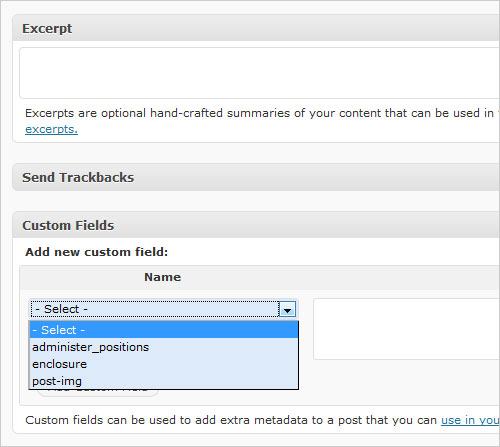
Giving specific examples is difficult because each website’s conditions are different. To aid the process, write down a list of special requirements that need to be implemented, so that the conversion to the new design is smooth and no features are forgotten. Taking the time to organize these specifics will save time down the road.
New and Updated Goals
A great redesign should account for how a website has developed since the last design was implemented. To correctly do so, one must analyze exactly how it has developed. What goals of the website have been achieved or expired, and what new goals need to be formulated?
If an new goal for the website is more user interactivity, a number of design elements could be implemented to achieve that result — in addition to all of the technical elements. Perhaps that means a better contact form, a more prominent “call to action” button or a more trustworthy design and color scheme to exude credibility.
With a redesign, we must start over, in a way, taking a fresh look at the website and where it needs to go. Below are a few resources on formulating and achieving your website goals.
- Define a Clear Goal for Your Website
- Reach Website Goals by Understanding the Customer Decision-Making Process (Part 1 of 2)
- Goal-Setting (About.com)
- Set Specific Goals to Increase Success
It’s About What Visitors Want
During the planning stage, consider what the visitors actually want. Conduct a poll, ask people directly, and especially ask those who have never visited the website before (via forums, community websites, etc.) for their fresh eyes.
Aside from asking visitors directly, you must understand your target audience. Many people do this during the planning phase of the initial design, and probably a few times throughout the course of the website’s life. However, a thorough in-depth analysis needs to be done again, and the redesign should reflect the interests of its users. Even for a website with a small audience, such as a portfolio, what kind of client is it currently attracting, and what kind do you want it to attract? Both questions should be considered to push a website in the right direction.
This is also the time to address any accessibility issues that the old design may have had. Think not only about what users want, but about what they need. Would the redesign benefit from a dark or light background? Would it benefit from larger or resizable text? What about a fixed or fluid design?