When To Relaunch The Site Redesign
Optimizing
As a website evolves, so does its content and keywords and probably your business plan as a whole. A redesign requires a fresh look at optimization. What are people searching for to get to your website? Where are they coming from? Are they finding what they need?
Optimize keywords, content placement and other SEO-related elements. The redesign is a great time to overhaul the website’s optimization systematically, so that the new design enhances it, rather than gets in its way. It’s also a great time to plan for the website’s loading speed. If it was slow before, a good redesign would make it faster.
Redesign aside, this step will also help you better assess your current content and how it can be improved. Better content goes great with a new look.
Check out the resources below if you are unsure where to begin:
- Web Page Analyzer
- Best Practices for Speeding Up Your Website
- Google’s Search Engine Optimization (SEO)
- SEO Book
Review Competitors
After obtaining this preliminary information, it’s time to start thinking outside the box. A quick review of competitors’ websites can help. Needless to say, don’t copy them, but noting their strengths and deficits is a great way to build your own website.
What design features do these competitor websites use? What is their content like? And what do they highlight? You may want to use similar techniques in your redesign or draw new ideas based on what you’ve seen.
Draw a list of competitors and take proper notes in your research. It will help you better understand your own design style, where they’re lacking and even what their goals are.
Analyze the Current Design
Of course, we’ve been analyzing our current design all along in the steps above, but when you go through it again this time, note any minor details in the design and functionality that could be improved. Also write down random thoughts that you might build on later.
This is the brainstorming stage. After writing down as many ideas as possible, organize the list into actionable steps.
1. Updating Your Brand
Our notes are prepared and our research done, and we are now ready to begin the redesign. The first step in this phase is to examine our brand. Having prepared this much, we may find that our logo, color scheme, tag line and other elements need adjustment.
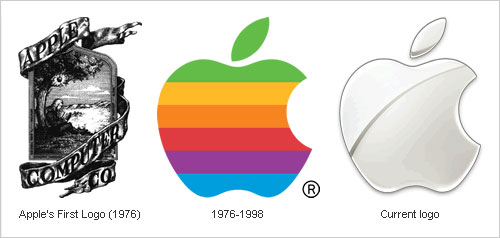
Of course, there is a difference between upgrading and re-doing a brand. Even upgrading a brand too much can do more harm than good. We’ll want to keep much of our brand the same (i.e. the general style, logo and message). But could we update it with any of the following?
- The logo should stay the same for the most part, but could it use a glossy makeover? If it was made years ago, technology and trends have changed; so while it should remain recognizable, it might benefit from a polishing.
- Examine your tag line, slogan or “elevator pitch.” Does it still match the purpose of the website today? Did it become outdated when you adjusted the goals of the website?
- Each website has its own style (e.g. creative, modern, sleek), and some websites mix styles. The design is a part of your brand. Going from a Web 2.0 style to a grunge style obviously wouldn’t make for an effective redesign. Whatever style you decide on will have to be in sync with your branding?
- Colors play a big role. You may want to cut down on or increase the colors, but your specific colors should stay the same. Perhaps you could introduce a complementary color, while still maintaining your others. Because color has such a big influence on mood and perception, the colors in the redesign should reflect your style and brand.
You’ll want to update your logo, too, including the overall look, the colors, and small details. Brainstorm on these elements, but always keep your updated brand in mind.
2. Wireframing
As designers, we know that wireframing ahead of time can yield better balance, alignment and visual hierarchy; and it is a great way to position everything early on without worrying about the details.
Site Map
At this stage, we can plan the site map. It may or may not be the same as before. As we continue in our steps, we begin to see that redesigning a website is not only about the design, but about usability, functionality and organization as well.
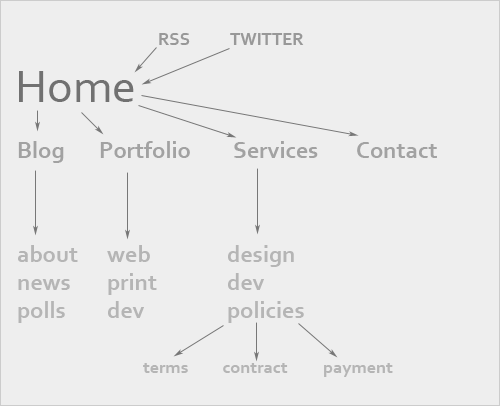
Begin with the home page, and work down through the primary navigation and on to secondary navigation. Various features will need to be added to certain pages (e.g. RSS link on the front page of the blog), so keep that in mind. Setting up a site map can aid in visualizing your content.
Without a site map, you can easily forget important content as you move to the wireframe, which would create problems down the road when you try to fit a certain element in somewhere.
The Wireframe Itself
Wireframing is definitely an art in itself, and it takes time and practice. It is one of the most important stages in the Web design process, so giving it due attention during the redesign is essential.
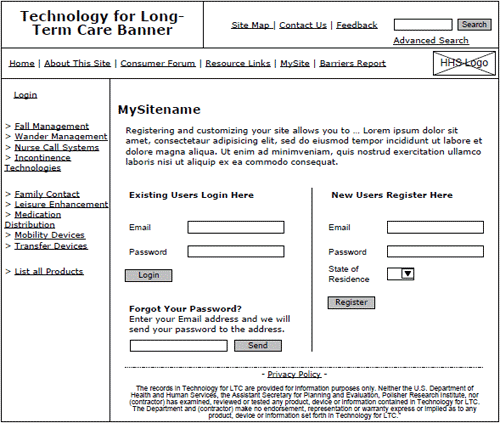
Working from your site map, create an initial wireframe that has everything you need. Then, improve upon a few of the ideas. Asking for second opinions on your wireframes can help as well. Ask your volunteers to point out the sections that stand out the most, the order in which they notice elements and the prominence of key features.
Because wireframing is a lot more involved than we can get into here, consult the list of resources below for assistance:
- Sitepoint’s Wireframe Your Site
- 16 Design Tools for Prototyping and Wireframing
- 35 Excellent Wireframing Resources
- Get Wireframing: The All-in-One Guide
- 20 Steps to Better Wireframing
3. Main Design
Now that we’ve planned and just begun redesigning our brand, we can move on to the exciting part: the actual website. Most of us who have given up our attempts to redesign in the past probably started the process at this stage. We opened Photoshop, chose a pretty color and gave up shortly thereafter.
Now, though, we are much better prepared:
- We have researched.
- We have worked out our branding, colors and style.
- We have laid down a wireframe.
Wow! We’re pretty much done—that is, at least with the boring stuff. At this point, we don’t have to stop the flow of our creativity to worry about technical details or about whether we’re doing it right or need to start over. We have it all planned out, and the plan is solid.
The only things to keep in mind for this phase are what we’ve already gone over. If your research spanned a few days or weeks, review what you’ve prepared. Print out the wireframe and site map and keep them on hand for reference. Start putting everything in place, and then go from there: add the design elements, detailing, alignment, balancing. Make the plan a reality.
4. Development And Testing
Finally, we’ve come to development and testing. Code the design (or outsource it) and make it fully functional. Mind the technical back-end requirements, as well as accessibility issues.
This process is fairly straightforward and needs no further explanation. If you stick to your plan, everything should run smoothly.
Testing and Review
Because we have transferred old content into a new design, we may find errors after we’ve completed the last step. In fact, we likely will. Use a link-checker to double-check all links, and check some manually. Test for speed, and optimize further if necessary. Double-check for validation one more time, and fix any behind-the-scenes errors.
This is also your last chance to ask volunteers to review your working version. You may have overlooked some accessibility issues, forgotten essential content or let some confusing elements slip in. Even with the most detailed planning, mistakes happen, and catching them before you launch is critical.
Your final testing should be thorough. You wouldn’t want to scare off your regular visitors.
Conclusion
As creative types, we constantly feel the need to redesign and improve our Web presence. Often, though, our website is good enough already, and we have to recognize that. The first best practice, then, is to consciously decide whether a redesign is needed at all.
If we decide that a redesign is needed, then we need to follow certain steps to ensure successful results. Without adequate preparation and a thorough analysis, even the best designers wouldn’t be able redesign their website effectively. It takes more than a great designer; it takes determination and organization. With these two characteristics, anyone can carry out the perfect redesign.
Further Resources
You may also be interested in these additional resources:
- How to Redesign a Website
.NET magazine’s insight on redesigning also includes a debate on whether to redesign in the first place, as well as many common obstacles to overcome. - 21 Factors to Consider Before a Redesign
A great set of questions to ask yourself during the redesign process. - Why Redesign Your Website
The article highlights the main reasons why one should redesign, supporting some points that other designers have argued against. - Redesigning Your Website: Who’s Taking Care of the Content?
This article goes into depth on how we need to plan for the content before starting the redesign. - 6 Things to Note Before Changing Your Site Design
An article similar to the one you’re reading, but with a bit more technical insight and advice.
Author: Kayla Knight
Kayla Knight is a college student, freelancer and blogger. In her spare time, she maintains two blogs, Webitect.net and DesignFinds.Me, as well as her portfolio. Feel free to get in touch with her through her blogs.