Website Maintenance Tips for Front-End Developers
One of the biggest advantages of online media over print is the ability to change, update, and enhance online media at virtually anytime, with virtually no negative side effects. In fact, if a website or web application does not continually offer its users an ever-evolving and growing experience, that site or application would soon become insecure, unusable, and out of date.
Have you beautified your code, validated your markup, and made your XHTML more semantic? Have you implemented basic SEO best practices, spell-checked content, and removed legacy code? Have you ensured JavaScript is unobtrusive, applied the principle of graceful degradation, and minimized the use of Flash? If you’ve done all those things (and possibly more), what comes next? Are there things you can do to improve your site’s overall effectiveness beyond those?
1. Keep Your Content Clean and Updated
After your website has accumulated dozens, maybe even hundreds of pages, content can become old and outdated. Website maintenance should include ongoing reviews of static content that may require updates or corrections. Of course, content that appears on blog or news pages would become outdated, but may not require changes. In those cases, the best solution may be to post new entries that update the information.
Of course, as a front-end developer for a company or agency, content maintenance would likely not be your responsibility, but if you’re a one-man web agency or another type of freelancer, content maintenance would be a vital part of your routine.
Policy Pages, Terms & Conditions, Terms of Service
Legal issues could arise if policies and terms pages are not adequately updated to reflect the latest company standards and procedures. Reviewing these types of documents that appear on your website or in your web application should be a regular part of your maintenance routine.
Software Documentation
Documentation associated with a product or service may also become out of date with new releases or bug fixes. Where time allows, your maintenance routine may also include regular additions and modifications to documentation, whether they appear online or in downloadable format.
Contracts
The services your company provides may require agreement to services between both parties by means of a legal contract. Is this document up to date, reflecting the latest company policies and standards?
Keep Your Blog Clean
If you are engaging your readers to participate in discussions on your blog, make sure that your posts do not contain spam comments. For instance, at the very least, regularly go through popular posts to manually remove comments that lead to suspicious sites. It’s also necessary to analyze tags that you’ve used. Some tags could be altered or modified to better reflect the topic, maybe because of a singular or plural rendering, or because of a misspelled word. You could also reconsider your tagging system and come up with a style guide that describes your process of tagging posts, which would improve future tagging and tag maintenance. You might also want to close comments on popular posts to avoid spam and link dropping.
2. Repairs, Fixes and Upgrades
The most common website maintenance tasks are those related to errors, bugs, broken links, and browser incompatibilities. There are server-side maintenance tasks that could be performed as well, but we won’t be considering any of those in this article. Let’s look at a few things a front-end developer could be responsible for in this particular area when performing website maintenance.
Checking Broken Links: Not Just URLs
Checking for broken links, both internal and external, is a fairly straightforward task, since there are a number of web-based and stand-alone tools that perform this task. But link checking can go beyond URLs; you can also check to ensure all images and external files are properly referenced. Here are some tools to assist with these tasks:
Dead Links is a free web-based broken link checker that is very easy to use, and has an easy-to-read results page. Dead Links only checks links from anchor tags in your markup.
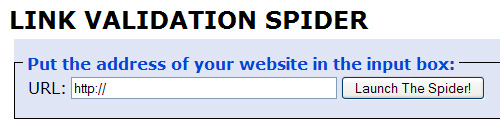
Xenu’s Link Sleuth is a free stand-alone link-checker application with numerous features. It checks broken links, image paths, backgrounds, external CSS, external JavaScript, and more.

Updating Your CMS & Plugins
If you’re using a popular content management system, chances are very high that at some point you’ll need to upgrade. This would be necessary for a variety of reasons — maybe the previous version has security problems, contains inefficient code, or just doesn’t work properly any more.
WordPress is one of the most widely used blogging frameworks, and it is used prevalently as a multi-featured content management system. Since there are thousands of WordPress plugins available, there are also bound to be hundreds of plugins that are no longer supported. Older, unsupported plugins that have not been updated by the plugin author to be compatible with the most recent version of WordPress could make your website insecure.

Fortunately, in recent versions of WordPress, updating your WP installation is as easy as a few clicks. Also, your dashboard will notify you when plugin upgrades are available. Your plugin page also gives you the option to view details on a particular plugin’s recent changes. So, if your site is running on WordPress, updating your WordPress and related plugins should be high priority items in your website maintenance to-do list.
It’s important to note that the upgraded version of your content management system won’t necessarily support all tweaks and plugins that you have carefully installed and customized when the site was launched. So, as part of your maintenance routine, make sure you find newer versions of plugins or else replace them with reasonable alternatives before upgrading your CMS.
3. Browser Compatibility Testing
Ensuring all aspects of your website or web application are functioning properly in the most commonly-used browsers should be an ongoing part of your maintenance routine. While valid, semantic code will give you the best chance for cross-browser success, there is still the need to do manual and, if necessary, automated checks to ensure optimal compatibility.
Compatibility with Lesser-Used Browsers
Ensuring your site’s compatibility with IE6/7/8 and Firefox 2/3 on a PC is commonplace in website maintenance. But don’t forget to check some of the recent releases of lesser-used browsers like Opera, Chrome, and Safari. Firefox, Opera, and Safari should also be checked, if possible, on a Macintosh, because there is the potential for variations in rendering. I’ve personally seen CSS layout quirks that occur in Safari on a Mac, but do not appear in Safari on a PC.

Automated Application Testing
Selenium Web Application Testing System
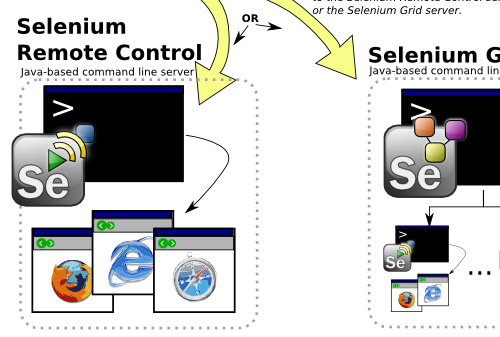
Selenium is a suite of tools specifically for testing web applications. The suite includes Selenium IDE (a Firefox plugin), Selenium Remote Control (which automates the process), and Selenium Grid (which allows concurrent tests on multiple platforms).
Online Compatibility Testing
Browsershots
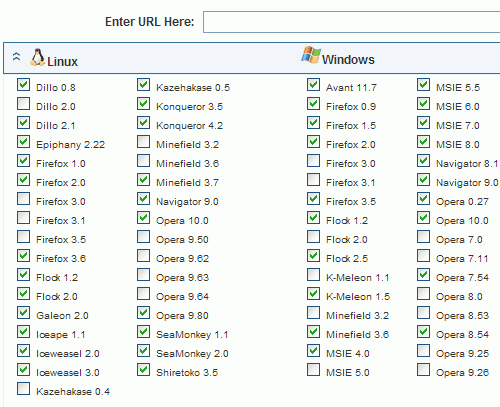
Browsershots is probably the most popular tool for viewing screenshots of your website in multiple browsers and on multiple platforms.
Adobe BrowserLab
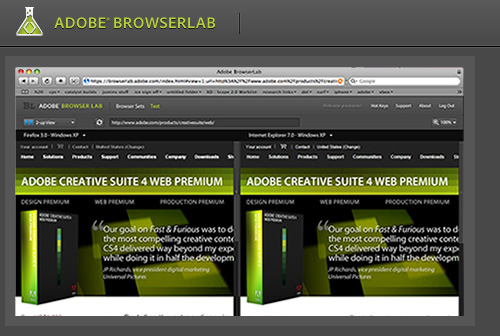
“Preview and test your web pages on leading browsers and operating systems — on demand. Adobe BrowserLab makes it easier and faster than ever before to see how your designs appear to your customers and audience. Get your results in real time, from virtually any computer connected to the web.”
Further reading: