Website Maintenance Tips for Front-End Developers
One of the biggest advantages of online media over print is the ability to change, update, and enhance online media at virtually anytime, with virtually no negative side effects. In fact, if a website or web application does not continually offer its users an ever-evolving and growing experience, that site or application would soon become insecure, unusable, and out of date.
4. Beyond Validation and Web Standards
Typically, website maintenance might consist of continued validation of pages, usually after features are added or content is updated. Validation might include both markup and styles. There are things, however, that can be done beyond just simple validation of pages, since “valid” code does not necessarily equate to “good” code.
Cleaner, Leaner XHTML
Are there components in your markup that can be reduced in size? When you first coded the site, you may have suffered from a problem called “divitis“. This basically means there are <div> tags in your code that could easily be removed because they don’t serve a purpose. A perfect example is the <div> wrapped around a navigation section, like this:
<div class="nav-holder">
	<ul class="nav">
		<li><a href="home">Home</a></li>
		<li><a href="about">About</a></li>
		<li><a href="services">Services</a></li>
		<li><a href="products">Products</a></li>
		<li><a href="contact">Contact</a></li>
	</ul>
<div>
In the above code, in most cases, the <div> element is unnecessary. If a CSS enhancement is needed on the entire navigation section, this can be done on the <ul> element, since it too is a block-level element. Of course, there could be a reason that the outer <div> is needed, but the code would generally be just as flexible without that element.
What about too many attributes? This is not as bad as having too many <div> elements, but code can start to look cleaner and be easier to manage if you avoid habitually putting classes and IDs on virtually every element. Using inheritance principles in CSS, instead of direct targeting of each individual element can trim your code down to a more manageable level. It should be noted, however, that in some cases, while removing attributes could improve the performance of your markup, it could have negative effects on the performance of your CSS, albeit at very small levels.
Further reading:
Improving the Quality of Your JavaScript
If you’ve created a lot of custom JavaScript, possibly in conjunction with a JavaScript library, your code might benefit from improvements. You can test the quality of your JavaScript code using Douglas Crockford’s JSLint, which he calls “the code quality tool.” I wouldn’t classify JSLint as a “validator”, because what is valid in JavaScript is not always what is best. In fact, many JavaScript techniques are now understood to cause major performance issues.
So consider whether you can include quality testing of JavaScript code as part of your regular website maintenance routine.
Further reading:
Cleaning & Optimizing CSS
After years of development, CSS files can become bloated, hard to maintain, and unreadable. Along the way, you may have learned to produce stronger code, so any future additions would be acceptable, but what about going back to optimize and refactor older CSS code? Many CSS files, over time, will develop redundancies that hinder speed.
There are a number of tools available to help with this task, all of which should be used with care. Before doing any optimizing, be sure to have backups of all CSS files, because automated tools, if used improperly, can render your code unusable.
W3C CSS Validation Service
Before doing any CSS optimization, you should first check to ensure your CSS is valid. Errors in your CSS code could cause problems when doing any automated optimization or refactoring.
Clean CSS
This online CSS optimizer offers many different options and displays details of all changes made.

Dust-Me Selectors (thanks, jeyaONE)
This useful Firefox plugin will tell you which CSS selectors are no longer in use, so you can safely remove them.
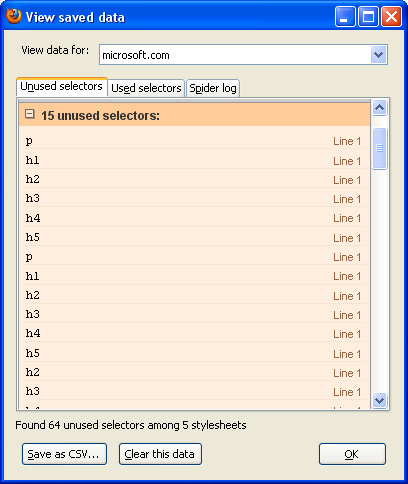
You also have the option to do all optimization manually, to ensure no problems occur. Of course, many optimization techniques cannot be automated. One example is combining multiple CSS files to minimize HTTP requests. Also, you may decide to change class names and ID names to reflect more appropriate conventions. (e.g. using the class name “promo-box” would be more appropriate than “blue-box”, since the color of the box could change).
Further reading:
- The Cascade, Specificity, and Inheritance
- 7 Principles Of Clean And Optimized CSS Code
- The right way to name id and class attributes
5. Improving Accessibility
If you’ve validated your markup and used best-practices coding techniques, then it’s likely that your site’s content is, generally speaking, accessible to users that are visiting your page using a screen reader or other assistive technology. But, since newly added content could affect the accessibility of your site, accessibility testing should be an ongoing process.
Tools to Test Website Accessibility
You can do ongoing checks for accessibility using a few tools, some examples of which are shown below.
WAVE – Web Accessibility Evaluation Tool
“WAVE is a free web accessibility evaluation tool provided by WebAIM. It is used to aid humans in the web accessibility evaluation process. Rather than providing a complex technical report, WAVE shows the original web page with embedded icons and indicators that reveal the accessibility of that page.”

A-Prompt – Web Accessibility Verifier
“A-Prompt (Accessibility Prompt) is a software tool designed to help Web authors improve the usability of Web pages created in HTML format. A-Prompt first evaluates an HTML Web page to identify barriers to accessibility by people with disabilities. A-Prompt then provides the Web author with a fast and easy way to make the necessary repairs.”
Besides using the tools shown above, a simple way to perform ongoing accessibility tests on your web pages is to view them with styles and JavaScript disabled. This will give you a general idea of what content will be accessible through assistive technology.
Testing Mobile Access
If you haven’t yet set up a mobile version of your website, there are a number of books and online resources that can assist you in this regard. If your mobile site is already up and running, you can continue to run tests on newly-added content and make adjustments as required. Below are a few helpful resources to assist you in making your site accessible to mobile devices.
Mobile Web Design by Cameron Moll
“Much has been written about mobile devices. Plenty has been written about developing websites for the so-called ’standards era’ of the web. However, little has been written about the two colliding. This resource aims to fill that void.”

5 free ways to create a mobile version of your website
This article discusses a few free services that will assist in creating a mobile version of your website.
Further reading: