Website Maintenance Tips for Front-End Developers
One of the biggest advantages of online media over print is the ability to change, update, and enhance online media at virtually anytime, with virtually no negative side effects. In fact, if a website or web application does not continually offer its users an ever-evolving and growing experience, that site or application would soon become insecure, unusable, and out of date.
6. CSS3 & HTML5 Enhancements
Although it is true that not all currently-used browsers support CSS3 and HTML5, new techniques in those areas can still be applied to work in newer browsers that offer support. During site maintenance, you can assess what areas of your website could be enhanced using specific CSS3 and HTML5 techniques. Of course, you would ensure that any modifications in this area will degrade gracefully in browsers that don’t support those new techniques. Progressive techniques, based upon CSS3 and HTML5, may help you finally get rid of the smell code and all JS/(X)HTML/CSS-hacks that you had to use when the site was launched.
CSS3.info
Everything you need to know about CSS3.

HTML5 Gallery
A showcase of sites using HTML5 markup.

Yes, You Can Use HTML 5 Today!
In this article on SitePoint, Bruce Lawson describes how HTML 5 techniques can be implemented in a cross-browser fashion using some JavaScript workarounds to support Internet Explorer.
5 CSS3 Design Enhancements That You Can Use Today
This article on Webdesigner Depot describes 5 CSS3 design techniques that can be used without harming the user experience.
Further reading:
- A Preview of HTML 5
- HTML5 and The Future of the Web
- Push Your Web Design Into The Future With CSS3
- Take Your Design To The Next Level With CSS3
7. Optimizing for Speed
A somewhat bizarre trend in recent modern web development is the seeming obsession with optimizing pages for speed — in spite of the continued rise in internet connection speeds worldwide. Although more people than ever before are on high-speed connections, more developers than ever before are concerned about the speed at which their pages load.
Analysis of a website’s performance during website maintenance may instigate a desire to make changes that will improve the speed at which pages load. If you’d like to include website speed optimization techniques into your maintenance routine, the following resources could prove useful.
Books by Steve Souders
High Performance Web Sites: Essential Knowledge for Front-End Engineers
This book, by Steve Souders, is the ultimate guide to optimizing a website’s load time, offering 14 specific techniques that can help you serve pages to your users quickly and efficiently.

Even Faster Web Sites: Performance Best Practices for Web Developers
This is Steve Souders’ follow-up to High Performance Websites, providing a further 14 tips and techniques for improving website speed.

Tools & Browser Plugins
6 Tools To Find Out Website Load Speed
This article describes six different tools for testing the load speed of web pages, including Yahoo! YSlow, Google Page Speed, Internet Explorer’s Pagetest, and more.
15 Tools to Help You Develop Faster Web Pages
Jacob Gube of Six Revisions gives an overview of 15 different tools that can help you analyze and improve the speed of your website.
8. Adding Comments to New (and Old) Code
If you’ve validated your code, and cleaned up unnecessary sections as outlined earlier, could your code benefit from further optimization? If time allows, during website maintenance, including comments in your XHTML, CSS, and JavaScript could improve the speed at which you make site updates in the future.
Commenting Your Markup
In some cases, comments won’t contribute a lot. For example, a <div> element with an ID of “sidebar” may not require a comment above it that says “This is the sidebar” — that’s obvious from the well-named ID. But your code could be easier to read with comments added to the bottom of sections where there are a lot of nested <div> tags.
The lower portion of your HTML code might look like this:
				</div>

			</div>

		</div>

	</div>

	<div id="footer">

	</div>

</div>

</body>
</html>
It might be difficult to make any major changes to this code without quickly being able to match the closing <div> tags to their opening tags. The same code would be easier for both front-end and back-end programmers with comments added, as shown below:
				</div><!-- /content-inner -->

			</div><!-- /content-inside -->

		</div><!-- /content-left -->

	</div><!-- /main content -->

	<div id="footer">

	</div><!-- /footer -->

</div><!-- /container -->

</body>
</html>
Commenting JavaScript
What about large sections of JavaScript that include nested loops that might be confusing long after you’ve written the code? It would be ideal to put comments in the code when writing it, but that’s not always done.
You can review complicated sections of JavaScript code and add relevant comments that will help you, when doing updates, to identify code more efficiently. Doing this type of maintenance might also help remind you to comment your code during actual development time in the future.
Commenting & Organizing CSS
CSS code can also be analyzed to see if improvements can be made by commenting or other organizational changes. I personally like to include global styles near the top of my CSS files, while indenting sections of CSS to correspond with the indenting of the HTML tags that they match up with.
Below is an example of commented and indented CSS:
/* FOOTER STYLES BEGIN HERE */

#footer {
	color: #A3A2A0;
	border-top: 1px solid #eee;
	min-width: 820px;
	height: 78px;
	font-size: .92em;
	line-height: 1.4;
	background-color: #fff;
}

   #footer p {
		float: left;
		width: 145px;
		margin-top: 5px;
   }

	  #footer p span {
			width: auto;
			float: right;
			padding: 15px 25px 0 0;
	  }

/* FOOTER STYLES END HERE */
Of course, when it comes to code improvements, what works best for your maintenance schedule and overall coding habits will be up to you. During site maintenance, your website may benefit from implementing some of these methods of commenting and organizing.
9. SEO Enhancements
As a front-end coder or designer for an agency or other company, you probably will not be responsible for SEO-related updates. If, however, this is a personal project or your own personal website, then you may need to do ongoing SEO maintenance.
Semantic, well-structured markup will automatically gain SEO benefits from the start — even without any specific search engine optimization techniques having been implemented. But, as time goes on, the integration of specific SEO methods may be required to boost your site in search rankings for particular search terms and phrases.

So, specific SEO optimization practices — optimizing keyword phrases, improving title tags, adding meta descriptions, writing good page titles, and optimizing internal link structure — are other items that could be added to a website maintenance to-do list.
Further reading:
10. Website Analytics & Conversions
Analysis of site traffic, bounce rates, traffic sources, and other web analytics-related statistics should be a regular part of a site’s ongoing maintenance. Of course, in an agency or corporate environment this area would fall under marketing or SEO. For a personal project, however, unless you’re outsourcing this type of work, you’ll need to continually analyze your site statistics to see where improvements can be made.
Improving “Call To Action” Areas
If you experience lower conversion rates than you’d like, your site could benefit from an adjustment in call to action buttons or similar components of your site. Wherever a user is located on your website, there should be a clear path to the services or products you offer. During site maintenance, changes could be made to ensure users are finding the most important parts of your website quickly and efficiently.

Analytics Tools
A number of free analytics tools are available, the most popular of which is Google Analytics, which is very easy to install. Most likely you’ve installed it on your website, but are you doing the necessary ongoing analysis?
You can look at keywords that are helping users find your website, and add new content according to those keywords. I once wrote an article for my own website based purely on a key phrase that was regularly used to find my site through Google. Now, since I wrote an article that specifically deals with the content of that key phrase, that page is the most visited page on my site.
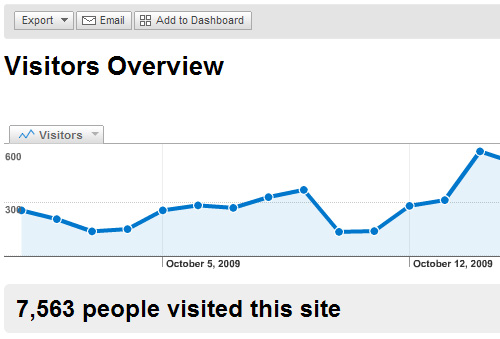
Google Analytics
Google Analytics is the premiere website statistics analysis tool.
Analytics Toolbox: 50+ More Ways to Track Website Traffic
This article on Mashable.com offers a list of more than 50 tools for tracking and analyzing website statistics.
Further reading:
- Your Website’s Call-to-Action is Its Central Purpose
- Ten Ways to Improve Your Website Conversion Rate
11. Incorporating User Feedback
A high-traffic, successful website should have clear methods for users to provide feedback. The most basic of these is the contact form or email address on the contact page. You could also collect feedback through social networking, polls, surveys, and blog post comments. Whatever means you’re using to receive input on the functionality and usability of your site, your ongoing maintenance routine could incorporate many of the suggestions you receive.

Some suggestions for improvement could be simple bug and error fixes, or compatibility problems. These could be itemized and corrected in a relatively short time. Other suggestions received, however, could require significant layout changes or page restructuring, so would have to be factored into long-term maintenance.
Whatever the case may be, obtaining and acting on feedback from users will allow your website to grow and thrive, and will give evidence to your users that customer service is your priority.
Conclusion
Leaving a website untouched after its initial launch is, in many ways, like buying a car and never changing the oil or never filling up on gas — it might run fine for a while, but eventually it will slow down and come to a complete halt, providing no benefit to its owner or passengers. An ongoing routine of regular, scheduled analysis and maintenance using many of the techniques mentioned in this article could prove integral to the success and overall functioning of your website or web application.
Author: Louis Lazaris